


esdraw
Bending draw.io into 2.5D: how I built isometric shearing as a plugin
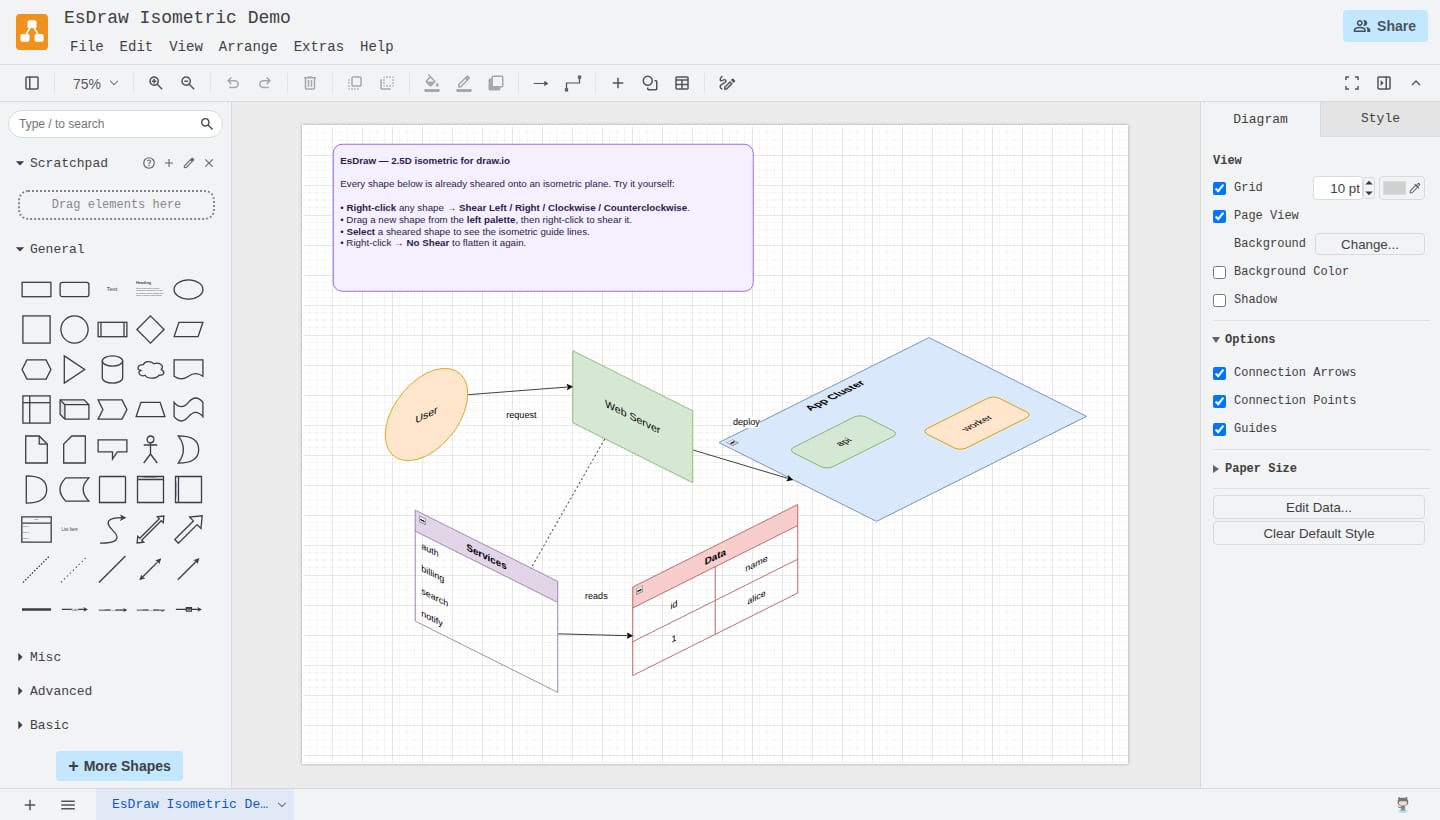
The itch
Isometric diagrams make infrastructure, network, and architecture drawings instantly readable. The problem is the tooling: you either pay for a dedicated isometric app, or you hand-fake the perspective in a general tool and fight it forever. Meanwhile the general tool most of us already have open is draw.io — free, open source, offline-capable, and embedded in Confluence, GitLab, and VS Code.
So instead of leaving draw.io, I taught it to go isometric. The result is EsDraw: right-click any shape, pick a direction, and it snaps onto a 2.5D isometric plane. There's a live demo — a real self-hosted draw.io with the plugin already loaded and a sample scene open — and the code is MIT on GitHub.
Don't eyeball isometric — match a real one
The fastest way to make isometric art look "off" is to guess the angle. I didn't want guesses, so I reverse-engineered a tool people already trust for this: icograms Designer. Poking at its live DOM and SVG transforms, the model is clean:
- A 2:1 isometric projection at exactly 26.565° — that's
atan(0.5), the angle whose tangent is ½. - Four absolute states, not additive nudges: shear Left, Right, Clockwise, Counterclockwise. "Left then Right" lands on Right — each is a fixed transform about the shape's centre, applied fresh.
- On selection, icograms draws crosshair "align lines" — a vertical axis plus two diagonals — so you can see the isometric planes. EsDraw reproduces those too.
Reducing the effect to four matrices (and their inverses) meant the whole feature could live as pure, testable math instead of a pile of special cases.
mxGraph doesn't want you to do this
draw.io is built on the mxGraph library, which renders cells to SVG but exposes no "apply an arbitrary transform to this cell and everything it owns" hook. So EsDraw monkeypatches a small set of prototypes — mxShape, mxText, mxCellRenderer, mxVertexHandler — to inject the shear at render time.
Shearing a plain box is the easy 10%. The other 90% is everything attached to the box:
- Labels.
mxTextoverridesredrawseparately, so it needs its own patch — and the text has to shear about the cell's centre, not the label's bounding box, or it drifts off the shape. - Container and list children. In draw.io a container's contents are independent cells. Shearing the parent does nothing to them unless the shear resolves up the ancestor chain to the nearest sheared parent and transforms each child about that parent's centre. Same story for list items, table rows, and cells.
- Fold controls. The collapse/expand chevron is drawn by a different code path (
redrawControl) and has to ride along on the sheared header. - Connectors. You can't hand an edge a single transform when its two endpoints belong to shapes sheared about different centres. Instead every point on the edge follows its own terminal's shear, so arrowheads stay glued to the (now isometric) connection points.
The deep end: the selection box and resize
The thing that took the longest was the least glamorous: the dashed selection rectangle and its resize handles. Left alone, they stubbornly stay axis-aligned around a shape that clearly isn't — it looks broken. mxGraph redraws those handles through redrawHandles (not the shape's redraw), so the shear had to be applied there too, to the border, the sizers, and the rotation handle.
Then resizing had to actually work along the sheared axes. When you drag a handle, mxGraph hands you a delta in screen space; EsDraw un-shears that delta back onto the cell's own axes, then adds a centre-shift compensation so the shape resizes in place instead of sliding away as its centre moves. Getting that right is what makes dragging feel like you're resizing an isometric object rather than a flat one wearing a costume.
Architecture: pure core, thin patches
The guiding rule was simple: if it's math, it's a pure tested function; if it touches the DOM, it's a thin, replaceable patch.
- The core (
src/iso/*) — style parsing, the four matrices, point/delta transforms, edge-endpoint math, resize math — has no mxGraph imports and sits at 100% unit coverage via Node's built-in test runner. - The glue monkeypatches mxGraph and mostly just delegates to the core.
- Browser behaviour is checked end-to-end with Playwright in a real editor.
That split is why the tricky geometry is verifiable in isolation and the integration is provable in a browser — and why every reverse-engineered finding (angles, transforms, align lines) could be written up in docs/design as the actual spec the code matches.
Try it, break it
The live demo is itself a small engineering artifact: CI fetches a pinned draw.io build, injects the plugin, and deploys it to GitHub Pages with a sample isometric scene already open — so you're clicking real draw.io, not a mock.
EsDraw is alpha (v0.1) and MIT-licensed. If you make diagrams for a living, I'd love to know where it breaks — exotic shapes, weird nesting, resize feel. Issues and stars welcome: https://github.com/softalink/esdraw.
Posting notes
- Paste into Medium, re-embed the cover image at the top, and add 2–3 more screenshots (a sheared container, the crosshair guides) to break up the text.
- If you also publish this on dev.to or your own blog, set the canonical URL on all copies to whichever you consider the original, to avoid duplicate-content SEO penalties.